
Tryonixs Blog
Virtual Try-On Software: The Complete Guide for E-Commerce Teams in 2026
A practical guide to virtual try-on software for store owners, developers, and retail leaders — covering AI face tracking, SDK integration, Shopify deployment, eyewear and beauty use cases, return reduction, and how to evaluate platforms.
Introduction
Online shopping removed the friction of driving to a store. It did not remove the uncertainty of buying products you cannot physically evaluate. When appearance, fit, or color drive the decision — as they do for eyeglasses, sunglasses, makeup, and fashion accessories — that uncertainty shows up in abandoned carts, hesitant shoppers, and costly returns.
Virtual try-on software closes the gap. It lets customers preview products on their own face through a live camera feed, directly in the browser, without downloading an app. What was experimental a decade ago is now a practical conversion tool deployed on Shopify stores, optical retail sites, and beauty brand storefronts worldwide.
This guide is written for e-commerce leaders, merchandisers, and developers evaluating virtual try-on for eCommerce. We explain how the technology works, what to look for in a platform, and how verticals from eyewear to cosmetics benefit. Whether you need a virtual try-on SDK for a custom build or a turnkey integration for Shopify, the evaluation framework is the same: accurate tracking, clean assets, reliable analytics, and an integration path that matches your stack.
If you are comparing vendors, planning a Q3 rollout, or answering a board question about AR investment, this article gives you the technical and commercial context to decide with confidence. We draw on patterns from optical retail, DTC beauty, and Shopify-native brands — the segments where virtual try-on delivers the clearest return on implementation effort.
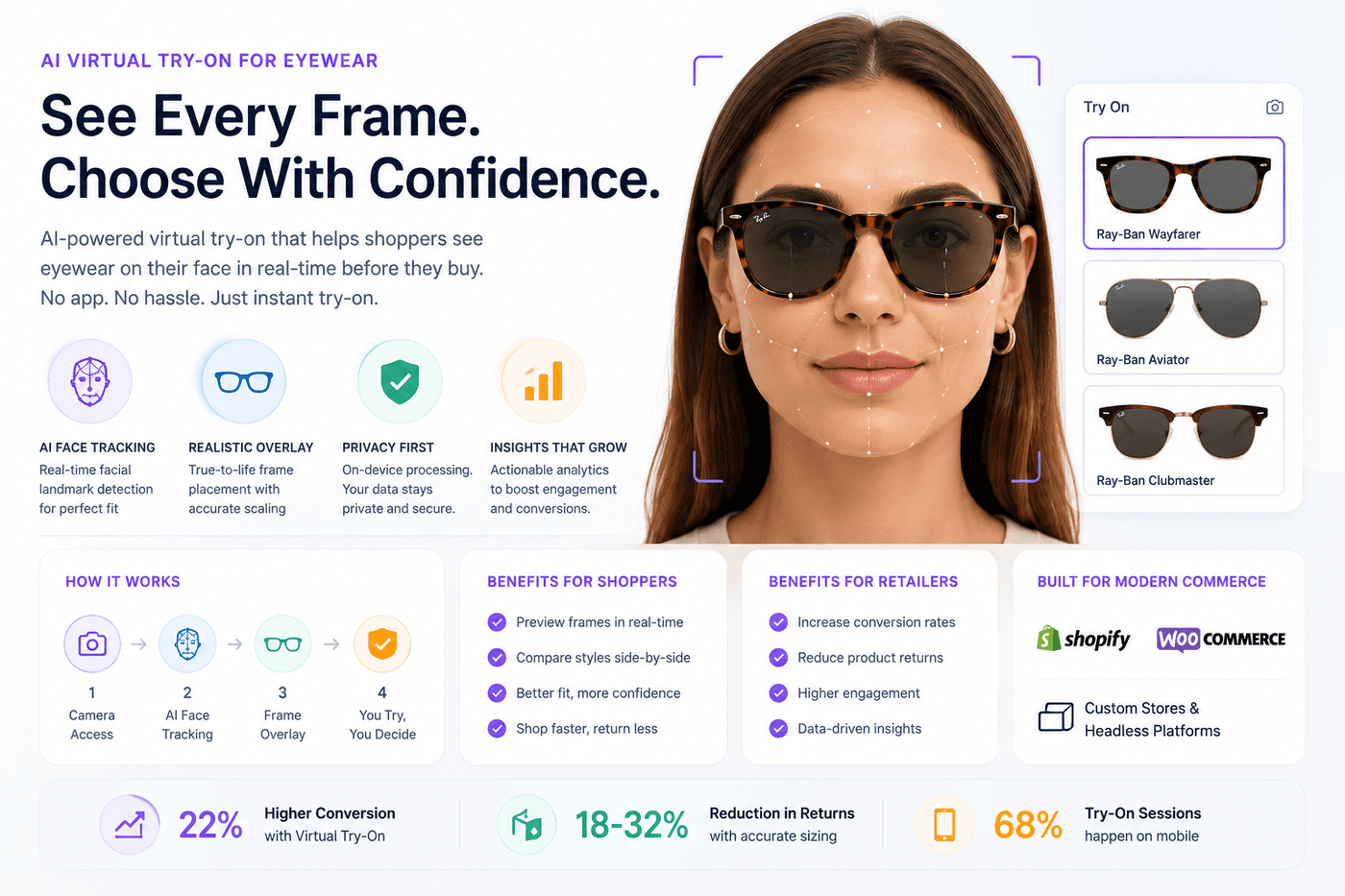
What Is Virtual Try-On Software?
Virtual try-on software is a technology platform that combines augmented reality, computer vision, and e-commerce integration to overlay digital product assets onto a live camera feed. When a shopper clicks Try On, the software accesses the device camera, detects facial geometry, and renders a frame, shade, or accessory with accurate scale and rotation.
The term describes more than the customer-facing mirror. A complete virtual try-on software platform typically includes four layers:
- A virtual try-on SDK — a JavaScript library that runs face tracking and rendering in the browser
- A virtual try-on API — server-side key validation, session tracking, and analytics
- A merchant dashboard for API keys, domain allowlisting, and usage reporting
- Platform connectors for Shopify, WooCommerce, and custom websites
Vendors may call this virtual mirror software or a virtual fitting room. The customer sees a mirror; your team integrates a platform. Both describe the same outcome: shoppers who can visualize products before they buy, reducing hesitation in categories where seeing is believing.
Virtual try-on software differs from static product photography, 360° spinners, and generic 3D viewers. Those tools help shoppers inspect product details. Only face-anchored AR virtual try-on answers the question that matters most online: How does this look on me?
From an organizational perspective, virtual try-on sits at the intersection of merchandising, engineering, and customer experience. Merchandising owns asset quality — the transparent PNGs and shade textures that determine visual credibility. Engineering owns SDK integration, API key management, and page performance. Customer experience owns button placement, mobile UX, and the permission flow that determines whether shoppers complete a session or bounce at the camera prompt.
Virtual try-on SDK vs API
Merchants often conflate the SDK and the API. The virtual try-on SDK is the customer experience: camera view, face tracking, asset rendering, and Try On UI. Your frontend developer works primarily with this layer — typically init() once per page and open() per product interaction. The virtual try-on API is the control plane: key validation, domain allowlisting, session analytics, and plan enforcement. Production stores use both. A polished mirror with no analytics API leaves you blind after launch; an API with no maintained SDK forces you to build the entire AR pipeline yourself.
How AI Virtual Try-On Works
AI virtual try-on replaces manual calibration with machine-learning models that detect facial landmarks in real time. The pipeline runs from button click to rendered product in four stages — whether you deploy eyewear, cosmetics, or accessories.
Camera access and video stream
The browser requests camera permission through WebRTC. The shopper grants access once per session. No native app install is required, which is the core advantage of web-based try-on over legacy native AR applications that never achieved e-commerce scale.
AI landmark detection
A face-tracking model — commonly built on MediaPipe or similar architectures — identifies hundreds of facial points each frame: eye corners, nose bridge, temple width, jawline, and lip contours. These coordinates update continuously as the customer moves, tilts, or turns their head.
Asset loading and spatial alignment
The platform loads a product asset mapped to the SKU — typically a transparent PNG for eyeglasses or a color texture for cosmetics — and calculates scale, rotation, and anchor position from landmark data. Production systems compensate for pitch, yaw, and roll so products stay anchored rather than floating like a sticker.
API validation and analytics
When try-on opens, the SDK may call a virtual try-on API to validate the public key, confirm the domain is allowlisted, and record a session event. This protects against key misuse and gives merchants visibility into usage against plan limits.
Tryonixs uses AI-powered face tracking optimized for eyewear placement, with expanding support for beauty categories. The entire inference pipeline runs client-side for sub-frame latency on modern mobile devices.
What happens in the first three seconds
Shoppers experience the pipeline as instant, but several operations complete in sequence. The SDK script loads asynchronously so it does not block Core Web Vitals. When the shopper taps Try On, the browser prompts for camera permission. Upon grant, the video stream starts, the landmark model initializes (often from a cached WASM bundle), and the first product frame renders — typically within one to two seconds on a current iPhone or Android device. Perceived speed matters: stores that bury the Try On button below the fold see sharply lower session starts regardless of tracking quality.
Asset requirements by vertical
AI tracking is only half the equation. Eyewear requires transparent PNG frame images at consistent scale — usually exported from CAD or isolated in post-production. Cosmetics requires swatch textures mapped to lip, cheek, or eyelid regions with blending parameters for opacity and finish (matte vs gloss). Fashion accessories may use PNG overlays or lightweight 3D models depending on the product. Skipping asset preparation is the single most common reason try-on disappoints on launch day.
Camera stream via WebRTC
AI landmark detection
Product overlay & render
Computer Vision and Face Detection
Computer vision is the foundation beneath every convincing try-on experience. Without reliable face detection, product assets drift, scale incorrectly, or detach when the shopper moves — instantly breaking immersion and trust.
Landmark models and real-time inference
Modern virtual try-on platforms use dense landmark models that output hundreds of 3D points per face. These models run in WebAssembly or WebGL on the client device, achieving frame rates suitable for live video on mid-range smartphones. Server-side video processing introduces latency and privacy concerns; client-side inference has become the industry standard for browser-based AR.
Vertical-specific tuning
Generic face detection is not enough. Eyewear virtual try-on requires temple anchoring and bridge alignment. Virtual makeup try-on requires lip contour mapping, cheek region detection, and skin-tone-aware blending. A platform tuned for one vertical may perform poorly in another. Evaluate vendors using assets from your actual catalog, not demo products you do not sell.
Lighting, angle, and edge cases
Production systems handle variable lighting, partial occlusion (hair over temples, hands near the face), and extreme head angles. Cheap implementations fail when shoppers look down or turn sideways — precisely the movements people make when evaluating whether a frame suits them. Ask vendors for mobile Safari demos under normal indoor lighting, not studio conditions.
Privacy by architecture
When face tracking runs entirely on-device, camera frames never leave the browser. Only discrete analytics events — session started, product ID, timestamp — reach the server if tracking is enabled. This architecture aligns with GDPR expectations and simplifies privacy policy disclosures compared to cloud-based facial analysis.
Performance and page weight
Face-tracking models add JavaScript and WASM payload to product pages. Production platforms lazy-load inference bundles only when try-on opens, keeping initial page weight minimal. Enqueue the SDK on product templates only — not site-wide — to protect Lighthouse scores. Test on real 4G connections, not office Wi-Fi, before judging load impact.
Accuracy benchmarks to request from vendors
Ask vendors to demo three scenarios: frontal face, 30-degree head turn, and looking slightly down (a natural pose when reading phone notifications). Frame temples should stay anchored through all three. Lip color should follow mouth movement without bleeding outside the lip line. If alignment breaks in any scenario, your catalog will expose the same failures at scale.
Types of Virtual Try-On
Virtual try-on is not a single product category. Implementations vary by vertical, rendering approach, and deployment model. Understanding the types helps you match software to your catalog.
Eyewear virtual try-on
The most mature category. Transparent PNG frame assets overlay the live camera feed, anchored at temples and bridge. Works for prescription frames, sunglasses, reading glasses, and blue-light eyewear. See a live demo in our eyewear try-on collection.
Virtual makeup try-on
Lipstick, eyeshadow, blush, and foundation map to specific facial regions with color blending shaders. Requires region-aware rendering beyond simple image overlay. Beauty brands use virtual makeup try-on to reduce shade-matching uncertainty — a leading cause of returns in color cosmetics.
Accessories and jewelry
Earrings, necklaces, hats, and watches use face or body tracking depending on placement. Scale accuracy matters: an earring that appears oversized destroys credibility instantly.
Apparel and fashion (2D and 3D)
Full-body garment try-on remains technically challenging at web scale. Many fashion brands start with accessories and headwear where tracking is reliable today, then expand as body-mesh technology matures.
Deployment models
- Browser-based SDK: JavaScript integration on product pages — lowest friction for shoppers
- Native app SDK: Higher fidelity in some cases, but app-download friction limits e-commerce reach
- Marketplace plugins: Pre-built Shopify or WooCommerce connectors with limited customization
- Custom headless: Same SDK wrapped in React, Next.js, or mobile WebView for full UX control
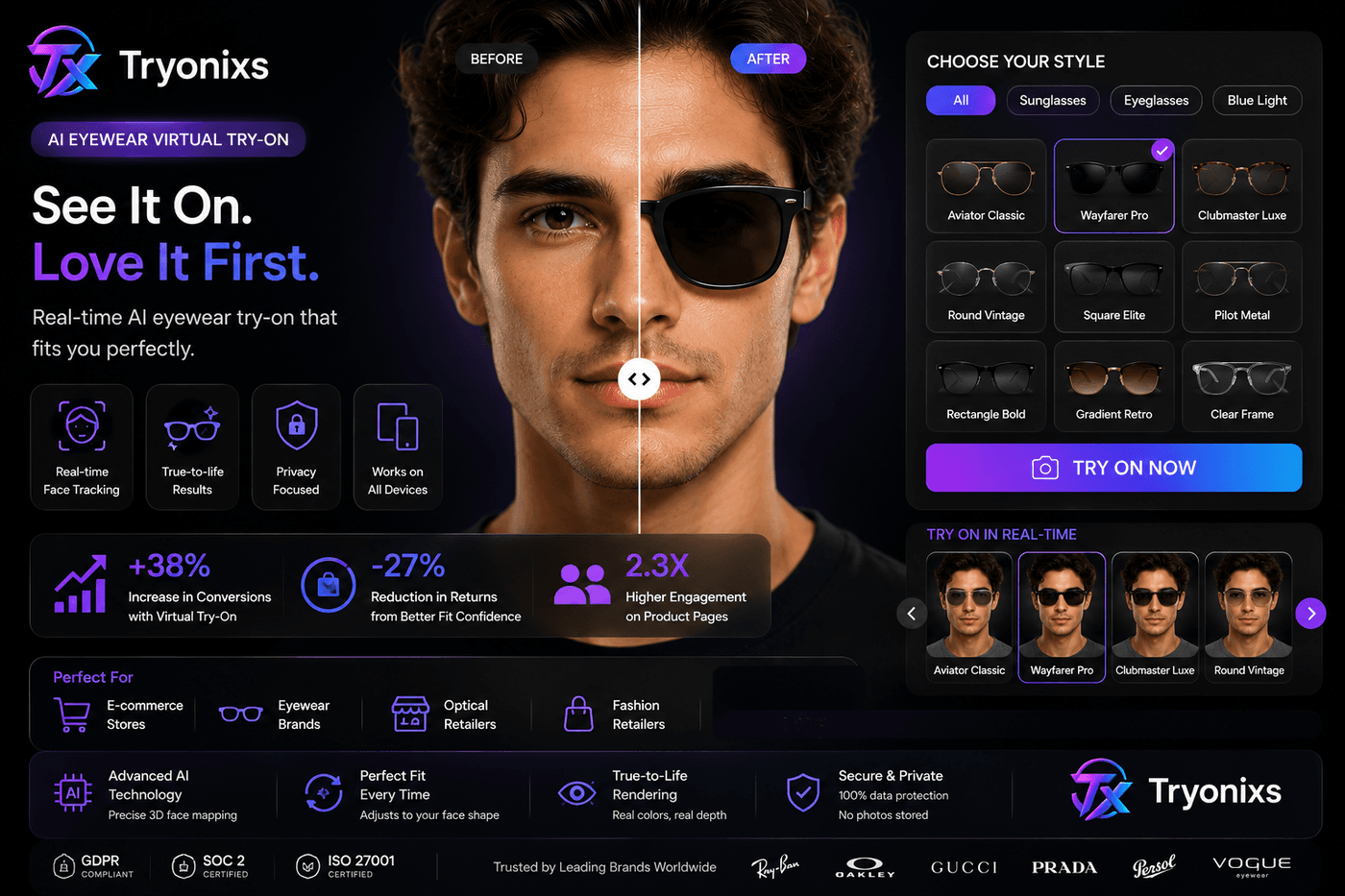
Benefits for Shopify Stores
Shopify merchants face a specific challenge: product pages must convert mobile traffic that will never visit a physical store. Virtual try-on for Shopify addresses that directly.
- Higher product page engagement: Try-on transforms passive scrolling into active participation. Sessions lengthen and bounce rates fall on SKUs with try-on enabled.
- Mobile-first experience: Browser-based AR works on the phones where most Shopify traffic arrives. No App Store download required.
- Fast integration: Snippet-based setup via Liquid themes goes live in hours, not months. Theme settings store API keys so non-developers can manage configuration.
- Per-SKU asset control: Product metafields map dedicated AR images separate from marketing photography — critical when your hero image shows a model wearing the product.
- Competitive differentiation: Most Shopify stores in eyewear and beauty still show flat photos only. Try-on signals innovation and builds trust with first-time visitors.
Full setup instructions are in our Shopify virtual try-on integration guide, including Liquid snippets, metafield configuration, and theme placement options.
Typical Shopify rollout timeline
- Hour 1: Create Tryonixs account, copy public API key, allowlist production and staging domains.
- Hours 2–4: Upload Liquid snippets to theme, configure theme settings, add Try On button to product template.
- Day 1: Map transparent PNG assets to 10–15 pilot SKUs via metafields.
- Day 2–3: QA on iPhone Safari and Android Chrome — camera permission, alignment, checkout flow.
- Week 2+: Expand to full catalog based on session analytics from pilot SKUs.
No Shopify App Store approval is required for snippet-based integration. Your theme developer controls placement and styling; Tryonixs provides the SDK and API layer. This separation keeps you off app subscription treadmills while maintaining full UX control.
Benefits for Eyewear Retailers
Optical retail is the original use case for virtual try-on — and still the highest-ROI vertical when assets and tracking are done correctly.
- Replicates the in-store mirror online: Independent optical shops and DTC frame brands give remote shoppers the experience of standing at a display mirror.
- Reduces multi-frame ordering: Customers who would order three frames to compare at home can narrow choices digitally first.
- Supports high-SKU catalogs: Stores with hundreds of frame styles benefit when shoppers explore more products per visit through try-on.
- Works across frame types: Prescription, sunglasses, readers, and blue-light frames all use the same transparent PNG workflow.
- Lowers support burden: Fewer pre-purchase emails asking whether a frame suits a face shape when shoppers can see for themselves.
The asset workflow matters as much as the software. A clean transparent PNG of the frame — no model face in the image — produces dramatically better alignment than cropping frames from lifestyle photography. Invest in asset quality before blaming the platform for poor results.
Optical retail scenarios
Independent opticians use try-on to compete with chains that invest heavily in in-store experience. DTC frame brands embed try-on on landing pages from Instagram and TikTok ads, reducing the gap between discovery and confident purchase. Multi-location chains roll out try-on across regional sites with centralized asset management from their PIM. In each case, the commercial goal is the same: replicate the mirror moment that closes sales in physical retail.
Prescription workflows add complexity — pupillary distance and lens options are not part of standard try-on — but style selection is. Most prescription purchases begin with frame choice. Virtual try-on addresses that first decision before the shopper enters prescription details or schedules an eye exam.
Benefits for Beauty Brands
Color cosmetics carry a unique purchase barrier: shade uncertainty. A lip color that looks perfect on a model may clash with a shopper's skin tone. Virtual makeup try-on addresses this directly.
- Shade exploration without samples: Shoppers test multiple colors in seconds, increasing items explored per session.
- Reduced return rates on color mismatch: Foundation, lipstick, and blush returns often trace to shade selection errors. Digital preview narrows the gap.
- Content and commerce alignment: The same try-on experience embedded on product pages extends to campaign landing pages and influencer partnerships.
- Cross-sell within routines: Shoppers who try one product often explore complementary shades and products in the same session.
Beauty brands should evaluate platforms with region-specific rendering — lip contour mapping, skin blending, and color accuracy under varied lighting — not just eyewear overlay capabilities repurposed for cosmetics.
Category-specific considerations
Lipstick and lip gloss require precise lip-line tracking and finish simulation (matte, satin, high-shine). Foundation and complexion products need skin-region masks with tone-adaptive blending — the same shade must look credible across skin tones. Eyeshadow and blush depend on eyelid and cheek landmark stability during expression changes. Brands launching virtual makeup try-on should pilot across their highest-return categories first — typically lip and complexion — before expanding to full color collections.
Benefits for Fashion Brands
Fashion e-commerce spans categories with varying try-on maturity. Headwear, earrings, scarves, and statement necklaces are deployable today with face and upper-body tracking. Full garment fitting remains an emerging capability.
- Accessory confidence: Hats, sunglasses, and earrings are appearance-driven purchases where digital preview adds immediate value.
- Brand experience elevation: Try-on signals a premium, tech-forward brand — particularly for DTC labels competing against established retailers.
- Seasonal campaign integration: Embed try-on in lookbook pages and collection launches to convert inspiration into purchase.
- B2B catalog demos: Wholesale teams use browser try-on in digital showrooms for buyer meetings without shipping physical samples.
Fashion brands benefit most when they start with categories where tracking is proven, measure engagement and conversion impact, then expand as body-mesh technology matures.
Luxury fashion houses often pair try-on with editorial photography rather than replacing it. The campaign image establishes aspiration; the try-on button converts intent into action. That combination works particularly well for sunglasses, hats, and statement earrings where a single SKU drives disproportionate margin.
How Virtual Try-On Reduces Returns
Returns erode margin in e-commerce. In eyewear, beauty, and fashion, a significant share of returns trace to style or fit mismatch — the customer simply did not know how the product would look before it arrived.
Style uncertainty is the root cause
When shoppers cannot evaluate appearance online, they compensate: order multiple variants, rely on generous return policies, or abandon the purchase entirely. Each workaround costs the retailer money or loses the sale.
Digital preview replaces physical comparison
Virtual try-on gives shoppers a reasonable approximation of how a frame, shade, or accessory looks on their face. It is not identical to an in-store fitting, but it eliminates the worst outcomes — products that looked nothing like the shopper expected.
Measurable impact
Retailers in fit-sensitive categories frequently report lower return rates on SKUs with try-on enabled. Results vary by catalog quality, traffic source, and UX placement, but the mechanism is consistent: fewer surprises at unboxing mean fewer return labels printed.
Secondary cost savings
Beyond reverse logistics, returns consume customer support time, restocking labor, and inventory availability. Reducing return volume improves unit economics across the entire fulfillment chain — not just the return line item on a P&L.
To measure impact, baseline return rate for your category before launch. After 90 days with try-on live on pilot SKUs, compare return rates against the same period prior year, controlling for seasonality.
ROI metrics beyond returns
Return reduction is the lagging indicator. Leading indicators appear faster: try-on session rate (sessions divided by product page views), average session duration, SKUs tried per visit, and add-to-cart rate for shoppers who started a session versus those who did not. Tryonixs dashboard analytics track SDK loads, session starts, and product coverage — use these to identify broken asset URLs and underperforming placements before quarter-end reviews.
A practical 90-day evaluation framework: Week 1–2, pilot 10–15 SKUs with clean PNG assets. Week 3–4, measure session rate per product page view. Month 2, expand to top 50 SKUs by traffic. Month 3, compare conversion and return metrics against baseline. Stores that skip asset quality rarely reach month three with confidence; stores that invest in transparent PNGs and mobile UX typically see session rates that justify full catalog rollout.
Features to Look For
Not all virtual try-on software is built for production e-commerce. Use this checklist when evaluating platforms — whether you sell eyewear on Shopify or operate a custom headless storefront.
- Browser coverage without app downloads: Chrome, Safari, Firefox, and Edge on iOS and Android. App-only solutions lose the majority of mobile web shoppers.
- Vertical-specific tracking accuracy: Eyewear needs temple anchoring; cosmetics needs lip and skin region mapping. Demo with your assets, not stock products.
- Documented SDK and API: Versioned JavaScript SDK with clear init/open methods. REST API for key validation, sessions, and analytics.
- E-commerce connectors: Shopify Liquid snippets, WooCommerce shortcodes, or headless integration samples for your framework.
- Per-SKU asset mapping: Metafields, product meta, or catalog API support for dedicated AR images per variant.
- Session analytics: Dashboard showing try-on starts, product coverage, and usage against plan limits.
- Domain allowlisting: API keys restricted to authorized domains to prevent quota theft.
- Client-side privacy architecture: Face tracking on-device; no video upload for inference.
- Performance on mobile: Acceptable frame rates on mid-range devices without blocking page load.
- Transparent pricing with a pilot tier: Free or low-cost entry to validate before full catalog commitment.
For most Shopify and WooCommerce stores, the deciding factors are integration speed, alignment quality with your actual PNG assets, and analytics — not exotic 3D features you will never deploy.
Security and compliance checklist
- Confirm face tracking runs client-side — no video upload for inference
- Review what analytics events are collected and whether they contain PII
- Enable domain allowlisting on all API keys before production launch
- Rotate keys if theme backups expose them in public repositories
- Update privacy policy to disclose camera use and optional analytics
Common implementation mistakes
Using lifestyle photos as AR assets produces misaligned overlays. Loading the SDK on every page hurts performance scores. Ignoring mobile Safari loses iOS shoppers — often half of beauty and eyewear traffic. Choosing app-only vendors adds download friction that kills conversion. Skipping domain allowlisting causes silent failures in production. Each mistake is preventable with the checklist above and a real-device QA pass before launch.
Comparison of Virtual Try-On Solutions
The virtual try-on market includes several approach types. Understanding the trade-offs helps you choose without overpaying for capabilities you do not need.
Browser SDK vs native app SDK
Browser-based SDKs reach every visitor on your product page. Native app SDKs may offer marginal fidelity gains but require app downloads that most e-commerce shoppers will not complete. For online retail, browser-first is the default choice in 2026.
Full platform vs point solution
Full platforms provide SDK, API, dashboard, and e-commerce connectors. Point solutions may offer only a widget with limited analytics or asset management. Production stores need both the customer experience and the operational layer to measure ROI.
Vertical specialist vs generalist
Generalist AR platforms cover many categories with varying quality. Vertical specialists — particularly in eyewear — invest in temple anchoring, PNG asset workflows, and optical retail integrations that generalists treat as secondary features.
Build vs buy
Building face tracking, rendering, and e-commerce integration in-house typically requires a dedicated AR engineering team and months of development. Buying a virtual try-on SDK lets merchants go live in days with a maintained, versioned library. Build only if try-on is your core product, not a feature on a retail site.
Comparison at a glance
| Approach | Best for | Trade-off |
|---|---|---|
| Browser SDK (Tryonixs) | Shopify, WooCommerce, custom web | Requires quality PNG assets per SKU |
| Native app SDK | Retailers with loyal app user base | App download friction limits reach |
| 3D product viewer | Product detail inspection | Does not show product on shopper face |
| In-house build | AR-as-core-product companies | High cost, long timeline, maintenance burden |
Run live demos with your actual product assets on mobile Safari and Chrome before signing a contract. Alignment quality differences become obvious within seconds.
Total cost of ownership
Price comparisons should include implementation labor, asset production, ongoing maintenance, and analytics review time — not just SaaS subscription fees. A lower per-session price with no Shopify connector may cost more in developer hours than a flat monthly plan with copy-paste snippets. An in-house build has zero licensing fees but six-figure engineering cost before the first shopper opens a session. Model TCO over 24 months at your expected catalog size and traffic volume.
When to choose each approach
Choose a browser SDK platform when you sell online through Shopify, WooCommerce, or a custom web storefront and need results within weeks. Choose a native app SDK when you already have a high-retention mobile app with significant daily active users. Choose a 3D viewer when product inspection — not facial appearance — is the primary question. Build in-house only when virtual try-on is your core product, not a feature on a retail site.
Why Businesses Choose Tryonixs
Tryonixs is built for e-commerce teams that need production-ready virtual try-on software without a six-month implementation project. Here is what merchants and developers cite when they choose the platform.
- Browser-based AR SDK: No app download. Works on mobile and desktop browsers your customers already use.
- Eyewear-optimized AI tracking: Realistic frame placement with temple anchoring and head-rotation compensation.
- Shopify and WooCommerce connectors: Liquid snippets, shortcodes, theme settings, and product metafields — go live in hours.
- Developer-first API: Validate keys, track sessions, measure catalog coverage from a merchant dashboard.
- Expanding beauty support: Foundation and color cosmetics try-on alongside core eyewear capabilities.
- Free Starter plan: 15 products, unlimited try-on sessions, no credit card — sufficient for a meaningful pilot.
- Privacy-aligned architecture:Client-side face tracking; camera data stays on the shopper's device.
Whether you are launching your first Shopify virtual try-on pilot or scaling an eyewear virtual try-on experience across a multi-brand portfolio, Tryonixs provides the SDK, API, documentation, and analytics to move from evaluation to production quickly.
Who Tryonixs is built for
Tryonixs serves three primary buyer profiles. E-commerce merchants on Shopify or WooCommerce who need try-on live without hiring AR engineers. Development agencies embedding white-label try-on across client storefronts via the JavaScript SDK. Enterprise retail teams evaluating volume pricing, custom integrations, and dedicated support for multi-brand portfolios. All three share the same requirement: production-ready software that works in the browser today, not a research prototype.
Explore the platform overview at virtual try-on software, review the developer documentation, or follow Tryonixs on Facebook, Instagram, LinkedIn, X, TikTok. For company background, see About Tryonixs.
Conclusion
Virtual try-on software has moved from experimental technology to practical infrastructure for e-commerce categories where appearance drives purchase decisions. The winning formula is straightforward: accurate AI face tracking, clean product assets, a reliable virtual try-on SDK and API, and integration with the platform you already operate.
Start with a focused pilot on your highest-traffic SKUs. Measure try-on sessions, refine your PNG assets, and compare conversion and return metrics against baseline. The stores that treat try-on as core infrastructure — not a one-time marketing gimmick — build durable advantage in eyewear, beauty, and fashion e-commerce.
Ready to add virtual try-on to your store?
Start with Tryonixs free Starter plan — 15 products, unlimited try-on sessions, no credit card required. Follow the SDK guide to go live on Shopify, WooCommerce, or your custom site in hours.
Frequently asked questions
What is virtual try-on software?
Virtual try-on software is a platform that combines augmented reality, computer vision, and e-commerce integration to display digital product assets on a live camera feed. Shoppers click Try On on a product page, grant camera access, and see how items such as eyeglasses, sunglasses, or makeup look on their face in real time — directly in the browser, without installing an app.
How does AI virtual try-on work?
AI virtual try-on uses machine-learning models to detect facial landmarks — eye position, nose bridge, temple width, and head rotation — in each video frame. Those coordinates drive how product assets scale, rotate, and anchor to the face. Rendering and face tracking run client-side in the browser for low latency and privacy.
What is the difference between AR virtual try-on and a 3D product viewer?
A 3D product viewer shows a model rotating in space. AR virtual try-on anchors the product to the shopper's own face or body using live camera tracking. For eyewear and cosmetics, only face-anchored try-on answers the question: how does this look on me?
Do customers need to download an app for browser-based virtual try-on?
No. Modern virtual try-on software uses WebRTC camera access and client-side AI face tracking in supported mobile and desktop browsers. Customers tap Try On, allow camera permission once per session, and the experience loads immediately.
Which browsers support virtual try-on?
Chrome, Safari, Firefox, and Edge on iOS, Android, and desktop support browser-based virtual try-on when the vendor maintains current WebRTC and WebGL compatibility. Always test on mobile Safari and Chrome before launch — they represent the majority of retail traffic.
How do I add virtual try-on to a Shopify store?
Install the vendor SDK via a theme snippet, add your public API key in theme settings, and map per-SKU transparent PNG assets through product metafields. Tryonixs provides Liquid snippets for auto-injection or manual button placement. Most Shopify merchants go live within hours to one business day.
What is a virtual try-on SDK?
A virtual try-on SDK is a client-side JavaScript library that renders the camera view, runs face tracking, loads product assets, and opens the Try On UI. Developers initialize it once per page and call open() with a product ID and image URL when the shopper clicks Try On.
What is a virtual try-on API?
A virtual try-on API is the server-side control plane: it validates public API keys, enforces domain allowlists, records session analytics, and manages plan limits. The SDK calls the API automatically; merchants use API-backed dashboard data to monitor usage and catalog coverage.
How accurate is eyewear virtual try-on?
Accuracy depends on face-tracking quality and asset preparation. Production eyewear virtual try-on anchors temples and bridge position, compensating for head pitch, yaw, and roll. Transparent PNG frame images without a model face produce the most convincing results.
Can virtual try-on work for makeup and foundation?
Yes. Virtual makeup try-on maps cosmetic products to facial regions — lips, cheeks, eyelids, and skin — using the same landmark detection pipeline as eyewear. Foundation and color cosmetics require region-specific blending shaders for realistic coverage.
Does virtual try-on reduce return rates?
Retailers in fit-sensitive categories frequently report lower return rates when shoppers preview products digitally before purchase. Virtual try-on reduces style uncertainty and the common workaround of ordering multiple sizes or colors to compare at home.
Is face data stored by virtual try-on platforms?
With properly architected platforms such as Tryonixs, face tracking runs entirely on the shopper's device. Camera frames are not uploaded for processing. Only anonymized analytics events — such as session starts and product IDs — are recorded if tracking is enabled.
How long does virtual try-on implementation take?
A focused pilot on 10–15 SKUs typically takes a few hours to one business day on Shopify or WooCommerce when assets are ready. Full catalog rollout depends on asset production volume. Custom headless integrations may take one to two weeks for engineering teams.
What product images work best for virtual try-on?
Transparent PNG assets isolated from lifestyle photography work best for eyewear. For cosmetics, high-resolution swatch textures mapped to facial regions outperform flat product photos. Avoid reusing storefront images that include a model's face in the frame asset.
How much does virtual try-on software cost?
Pricing models vary: per-session, per-SKU, or flat monthly SaaS. Tryonixs offers a free Starter plan with 15 products and unlimited try-on sessions — sufficient for pilots. Enterprise tiers add volume pricing, custom integrations, and dedicated support.
Can I use virtual try-on on WooCommerce?
Yes. WooCommerce stores enqueue the SDK on product templates, place Try On buttons via shortcodes or product hooks, and store per-SKU frame URLs in product meta. The same JavaScript SDK and API used on Shopify works on WordPress with platform-specific wiring.
How does virtual try-on improve conversion rates?
Try-on turns passive product browsing into active participation. Shoppers who visualize products on themselves report higher purchase confidence, spend more time on product pages, and explore more SKUs per session — leading indicators that frequently correlate with improved conversion in eyewear and beauty.
What features should I look for in virtual try-on software?
Prioritize browser compatibility without app downloads, vertical-specific face tracking accuracy, documented SDK and API, e-commerce platform connectors, per-SKU asset mapping, session analytics, domain allowlisting, client-side privacy architecture, and transparent pricing with a pilot tier.
Is virtual try-on suitable for fashion and accessories?
Yes. Beyond eyewear, virtual try-on supports hats, earrings, necklaces, and other accessories using face and upper-body tracking. Fashion brands benefit from the same engagement and confidence gains when appearance drives the purchase decision.
How do I choose between virtual try-on vendors?
Run a live demo with your actual product assets on mobile Safari and Chrome. Evaluate frame or shade alignment quality, integration effort for your platform, analytics depth, privacy model, and total cost at your catalog size. The best vendor is the one that looks convincing with your assets and goes live quickly.
Follow Tryonixs
Connect with Tryonixs on social media for AR virtual try-on updates, product launches, and eyewear technology insights.
Ready to add virtual try-on to your store?
Start free with Tryonixs — 15 products, unlimited try-on sessions, Shopify and WooCommerce integrations included.